¶ Add a shared calendar in Outlook
¶ 📅 Outlook Desktop (Windows / macOS)
Open Outlook
Go to Calendar
Click Add Calendar -→ Add from directory
Select in “Please select an account to search from” -→ should be your own
Choose From Address Book or From Shared Calendar, or type the requested Address
Select the person or shared mailbox
Choose in "Add to" section, where you will see the added calendar
Click OK
The shared calendar will appear under Shared Calendars.
¶ 🌐 Outlook Web (Outlook on the web)
Open Calendar
Click Add Calendar -→ Add from directory
Select in “Please select an account to search from” -→ should be your own
Choose From Address Book or From Shared Calendar, or type the requested Address
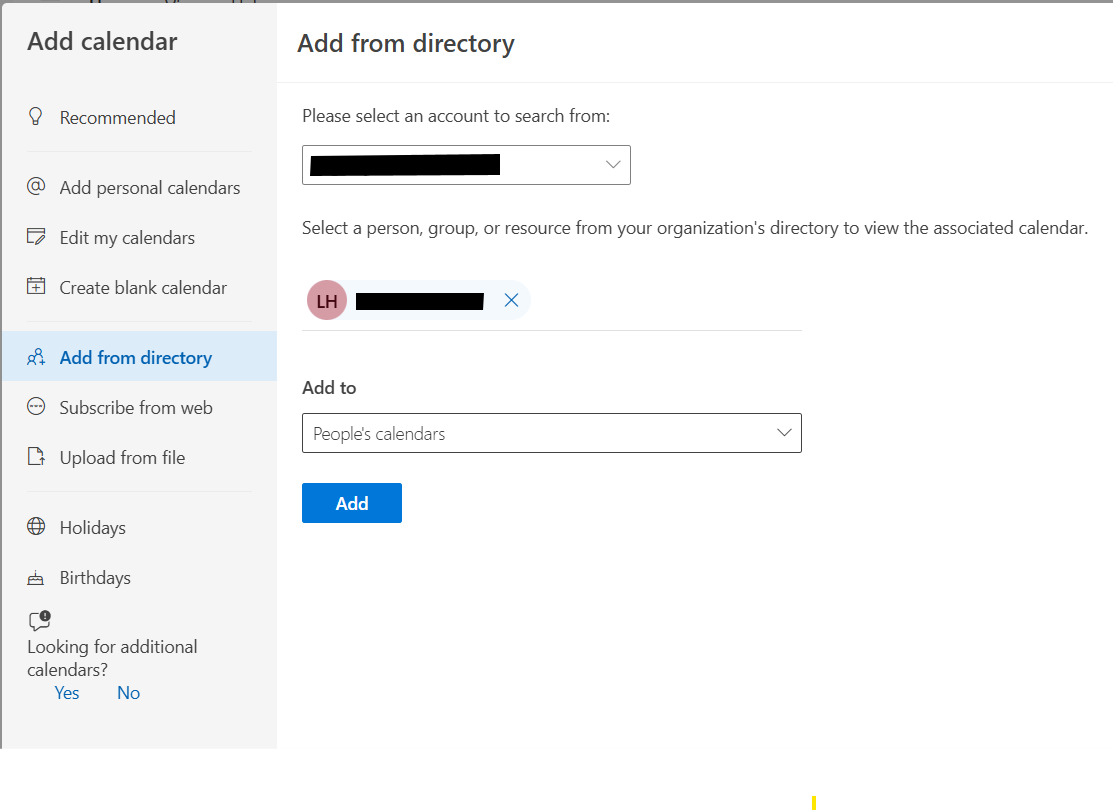
Select the person or shared mailbox
Choose in "Add to" section, where you will see the added calendar
Click Add
¶ 📌 Using a Shared Mailbox Calendar
If the calendar belongs to a shared mailbox:
Make sure you have calendar permissions
Add it using From Address Book
¶ 🔐 Permissions needed
The calendar owner must grant you at least:
Reviewer (view only), or
Editor (view and edit)